
Features
Equipment Management Software
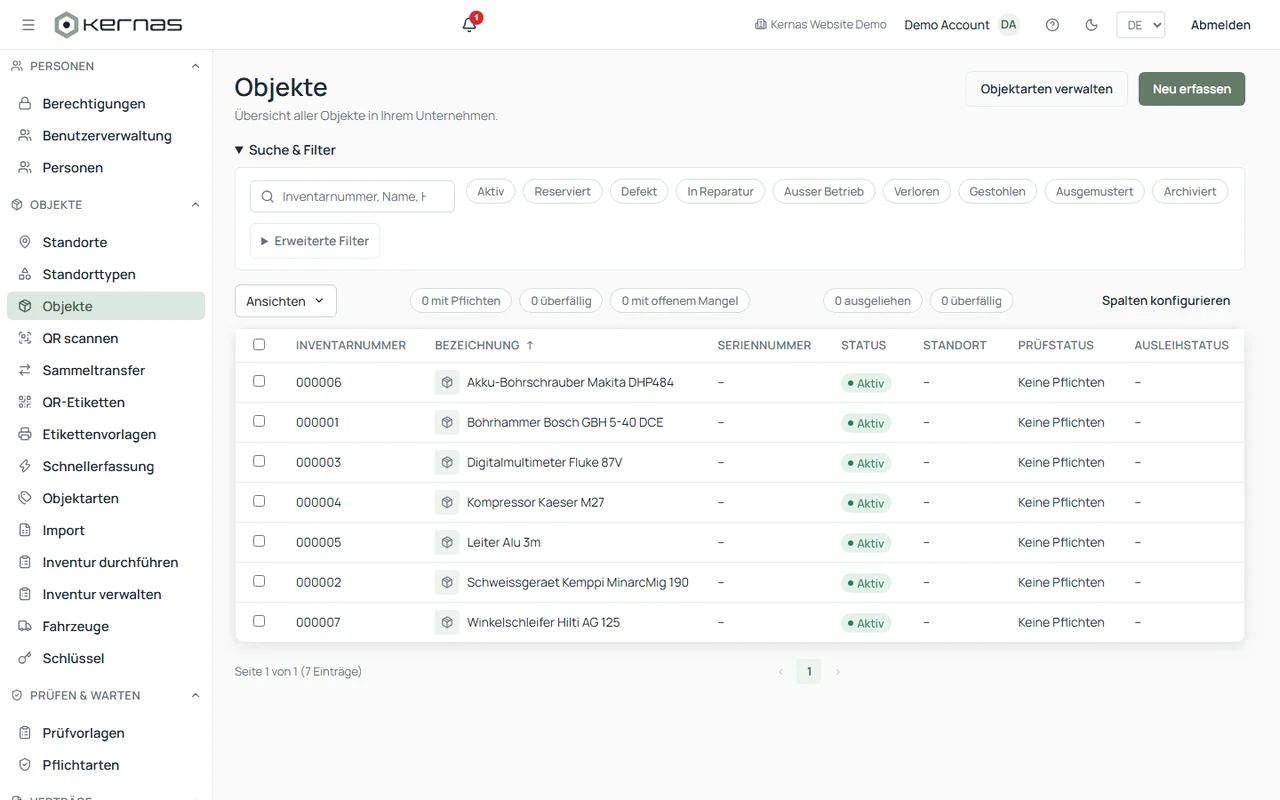
Kernas manages your equipment — from machinery to devices and tools — in one place, with QR code labelling and automatically calculated inspection and maintenance deadlines.
Up to 50 objects free forever · no credit card required
Equipment without a system
Many businesses still track their equipment in spreadsheets, or not centrally at all. Without central management, unclear ownership, unnecessary time spent searching and missing visibility into upcoming inspections build up quickly.
All your equipment in one place
Kernas makes equipment easy to find centrally and creates transparency over locations, responsibilities, and upcoming inspections and maintenance. Capture your inventory manually or through an AI-assisted import from an existing Excel or CSV list, label each item with a QR code, and assign a location and a responsible person.
A typical workflow
Capture equipment → attach a QR label → assign location and responsible person → set inspection/maintenance deadlines → when due: scan the QR code, log the result.
Identify by QR code
Every piece of equipment gets a unique QR label. Scanning it on site pulls up the stored information — current location, responsible person, and the next inspection due date.
Inspections and maintenance
Kernas includes a pre-installed catalog of common inspection and maintenance obligations for Germany, with the relevant background information stored for each entry. Which obligations actually apply depends on the business and its use case. You can also add your own obligations with individual intervals, requirements and additional information. Due dates are calculated automatically once an obligation is assigned to a piece of equipment, and upcoming deadlines stay reliably in view.
From spreadsheets to digital equipment management
Many companies start their equipment management in Excel. As the inventory grows, manual lists quickly become confusing: locations change, ownership shifts, and inspections have to be tracked separately. Existing Excel or CSV files can be imported into Kernas — it recognizes the contained data and helps match it to the right fields, so equipment can then be managed centrally from there on.
Features
- AI-assisted import of existing Excel or CSV lists
- QR code labels for identification
- Assignment to people and locations
- Pre-installed catalog of common inspection and maintenance obligations
- History with proof of completion for every item
- Stocktaking directly on your smartphone
Benefits
- Less time spent searching
- Better visibility into upcoming inspection dates
- Traceable history
- Overview across all locations
Frequently asked questions about equipment management
What is digital equipment management?
Digital equipment management captures and manages equipment centrally in software instead of spreadsheets or paper. With Kernas, you can also assign a location, a responsible person, a status and inspections to each item.
What kind of equipment can be managed with Kernas?
Machinery, devices, tools, vehicles and other movable equipment, each as its own asset.
Can equipment be labelled with QR codes?
Yes, every item gets a unique QR label from freely designable templates.
Can existing Excel data be imported?
Yes, existing Excel or CSV files can be imported, and Kernas helps match the data to the right fields.
Can inspections and maintenance be assigned to a piece of equipment?
Yes, through the pre-installed catalog for Germany, or with your own obligations and individual intervals.
Does Kernas also work on mobile?
Yes, including stocktaking and QR scanning directly on your smartphone.
Ready to digitize your inventory?
Get started with Kernas today.
- GDPR-compliant
- Swiss-made
- Modern encryption
- Regular backups